If you cannot find your question here, please contact pressuresuite@keller-pressure.com or create a new issue on GitHub.
- What does “cloud”, “IoT”, “LoRa” mean?
- What kind of IoT devices does KELLER have?
- What does “PressureSuite” even mean?
- What is the “PressureSuite Cloud”?
- Why did you change the name from “KOLIBRI” to “PressureSuite”?
- What is the feature roadmap?
- The customer wants to create their own web app or mobile app. How can KELLER assist?
- The customer does not want to use our “cloud” and wants to manage and present the data themselves. How can KELLER assist?
- Where can I find marketing or promotional material?
- How do I sign up? How do I log in? How can I test it?
- Does the website also work on a mobile phone?
- What alarms are there?
- How do I know that the devices are communicating?
- Can I use existing data from the GSM2Datamanager switch to the PressureSuite Cloud?
- The customer needs a new feature. How do I proceed?
- I discovered a software error. How do I contact KELLER?
- How does LoRa technology work, and what are the advantages?
- What is an API?
- Where is the data stored?
- How does the data get from the devices to the WebApp?
- How safe is the cloud?
- Are there any specific standards that the cloud fulfills?
- Are there terms of service (ToS)?
- Does the chart show all measurement points?
- Can I use my own SFTP server?
What does “cloud”, “IoT”, “LoRa” mean?
IoT (“Internet of Things”): A term that describes a system or network of devices with sensors that work together, or with users, by exchanging information such as measurement data over the Internet.
KELLER has been using IoT devices for many years, including cellular data loggers and now also LoRa devices.
Cloud: “Cloud computing” refers to storing and accessing data and programs over the Internet instead of saving data on a local hard drive. The term “cloud” is also used as a metaphor for the Internet.
LoRa (long range): A long-range, low-power wireless platform and a popular IoT wireless protocol. Similar to cellular radio, measurement data from KELLER sensors can be sent wirelessly to the nearest antenna or gateway and from there forwarded via the Internet to FTP or mail servers, or even LoRa servers. Compared with cellular radio, LoRa is cheaper and requires less power, which allows for smaller and less expensive batteries.
See more at https://docs.pressuresuite.com/sending-technology/lora-technology/
What kind of IoT devices does KELLER have?
See https://keller-pressure.com/en/products/wireless-solutions
KELLER sells the ADT1 (low-cost) and the ARC1 (robust) devices in a tube, a box, or a box with special safety barriers. Both device categories can send data either via cellular technology (2G/3G/4G/NB-IoT/LTE-M) or via LoRaWAN.
What does “PressureSuite” even mean?
PressureSuite is the successor to KOLIBRI. It is the new name of the product line.
Currently, this product line contains:
-
PressureSuite Cloud: Web portal for customers to access data
-
PressureSuite Desktop: The logger software application we use to store and visualize data from data loggers on a Windows PC.
-
PressureSuite Mobile: The iOS and Android app that lets you load measurement data from KELLER data loggers to a smartphone via Bluetooth.
These products all use current technologies and a customized design. In addition, you can download and upload data between PressureSuite Desktop, PressureSuite Mobile, and PressureSuite Cloud.
Why did you change the name from “KOLIBRI” to “PressureSuite”?
We had to change the name for legal reasons. Until the end of 2024, the API endpoint https://api.kolibricloud.ch/v1/ remained available. Please be aware that this endpoint has been shut down. Please switch to https://api.pressuresuite.com/v1/ as soon as possible. All queries and responses should behave the same.
What is the “PressureSuite Cloud”?
PressureSuite is the name of the new KELLER Pressure product line. Part of this product line is PressureSuite Cloud, which includes:
-
WebApp: The online application at https://www.pressuresuite.com
-
API: A standardized interface for transferring data such as measurement data in a common Internet format to other programs, services, or clouds.
-
Documentation: Explanations of how to interpret the measurement data of cellular and LoRa devices, how the API works, and how to use the documented protocols and examples.
-
Tools: To simplify the integration of our IoT devices, sample programs and libraries are available free of charge and, in some cases, as open-source projects.
What is the feature roadmap?
The customer wants to create their own web app or mobile app. How can KELLER assist?
Customers may use our WebApp to see that their devices are sending data as a proof of concept. This means they can immediately start testing our devices in their environment. They can then use our API to query the data. After that, they can develop their own user interface and connect it to our API. We support them with sample programs and good documentation.
The customer does not want to use our “cloud” and wants to manage and present the data themselves. How can KELLER assist?
Customers may use our WebApp to see that their devices are sending data as a proof of concept. This means they can immediately start testing our devices in their environment. During the testing phase, they can start using our documentation to integrate the devices into their own solution.
Where can I find marketing or promotional material?
Please contact marketing@keller-pressure.com.
How do I sign up? How do I log in? How can I test it?
See https://www.pressuresuite.com. For anyone interested, there is a test user account (Demo1234 / Demo1234) that can be used to log in and try out the WebApp. Several test devices and their measurement data are visible there. The login password can be found on https://www.pressuresuite.com.
Does the website also work on a mobile phone?
Yes. The site is optimized for PCs and Macs with larger screens. The WebApp is responsive and therefore also works on mobile phones. However, due to the limited screen size, the chart display is difficult to use. The mobile version is mainly intended for monitoring triggered alarms and the current status of all devices.
What alarms are there?
There are three categories:
- Application alarms: Alarms that the customer can set and that are related to their application
- Level alarm: Here you can select a minimum or maximum value for any channel, for example: “If channel ‘Pressure 1’ exceeds 2.5 bar, then trigger an alarm.”
- Device alarms: These are alarms that are automatically triggered if a device experiences an unusual condition. For example:
- Low battery capacity / critical battery capacity
- Low battery voltage / critical battery voltage
- Extraordinary humidity in the sensor
- Device does not send data or sends data late
How do I know that the devices are communicating?
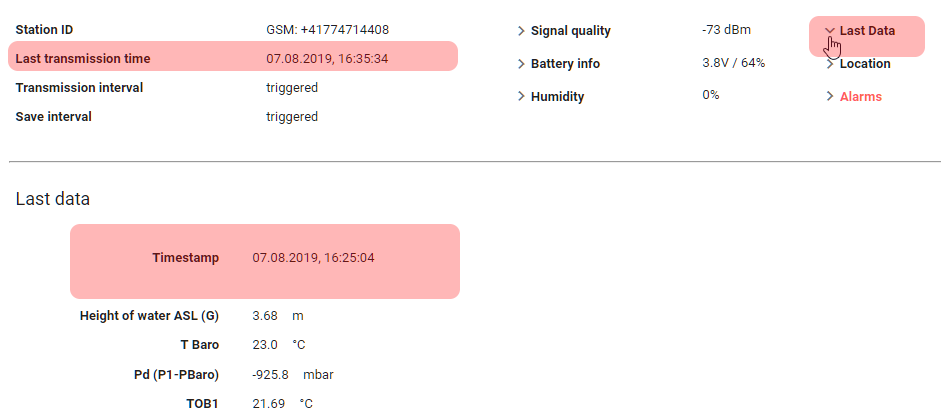
On the WebApp, you can see the time of the last communication.
Can I use existing data from the GSM2Datamanager switch to the PressureSuite Cloud?
It is possible to load data from GSM2DataManager databases into the cloud. This usually requires several hours of work and may be a chargeable service. Your sales contact will help you find a fair solution.
The customer needs a new feature. How do I proceed?
Please contact pressuresuite@keller-pressure.com.
I discovered a software error. How do I contact KELLER?
Please contact pressuresuite@keller-pressure.com.
How does LoRa technology work, and what are the advantages?
LoRa (long range) is a long-range, low-power wireless platform and a popular IoT wireless protocol. Similar to cellular radio, measurement data from a KELLER sensor can be sent wirelessly to the next antenna or gateway and from there forwarded via the Internet to FTP or mail servers, or even LoRa servers. Compared with cellular radio, LoRa is cheaper and requires less power, which allows for smaller and less expensive batteries.
See https://docs.pressuresuite.com/sending-technology/lora-technology/
What is an API?

The Internet and many Internet-based products essentially consist of devices and services that communicate with each other. The format of this communication is often a REST API. Many large companies provide APIs. Google Maps, for example, uses an API to query locations and respond to maps and coordinates.
APIs are not something only developers can use. The PressureSuite Cloud API can also be tested, if authorized, at https://api.pressuresuite.com/swagger/index.html?url=/swagger/v1/swagger.json.
If a software application asks, for example, “Give me the list of all devices”, the answer would be:
https://api.pressuresuite.com/v1/Devices
In response, you get the following from PressureSuite Cloud:
{
    "totalRecords":3,
    "devices":[
        {
            "id": 1004,
            "name": "Eulach 03",
            "networkNode": "Winterthur",
            "transferType": "GSM",
            "gsmNumber": "+ 41774691179",
            "euiNumber": null
        },
        {
            "id": 1005,
            "name": "Eulach 10",
            "networkNode": "Winterthur",
            "transferType": "GSM",
            "gsmNumber": "+41774692307",
            "euiNumber": null
        },
        {
            "id": 1508,
            "name": "Pascal Swisscom 05",
            "networkNode": "Winterthur",
            "transferType": "LoRa",
            "gsmNumber": null,
            "euiNumber": "0004A30B001E5CD8"
        }
    ]
}
This data format is called JSON, a standard format that can be easily processed by all programming languages.
An API is very powerful. A customer can use the API to retrieve all of their data, save it, or display it in whatever way suits them best.
Where is the data stored?
All data is stored in an EU data center in Ireland in a SQL database. It is automatically backed up every 10 minutes.
How does the data get from the devices to the WebApp?
The entire system is not that complicated.
- The data from our sensors is regularly stored on FTP or mail servers.
- In the background, PressureSuite Cloud is a collection of many small programs (Azure Functions) that perform regular tasks. For example, every 5 minutes all FTP and mail servers are checked for new data, and any new data is stored in a data queue.
- As soon as a new message is available from LoRa, it is stored in a data queue.
- Another program monitors the data queue, analyzes the content and origin, converts the data, and stores it in a database.
- There are other programs that regularly check the measured data for abnormalities and, if necessary, generate alarms and send emails.
- At the same time, there is our API. It is the gateway to the database. No customer can access the database directly. Everything goes through the API.
- You can log in with a username and password. An external service authorizes the user and responds with a special key that correctly identifies the user and allows access to our API.
- Thanks to the key, the API knows which data it is allowed to send to the user or program.
- The WebApp is one such program that collects all data via the API. The measurement data are also sent to the WebApp in compressed and encrypted text formats. The WebApp itself generates a chart based on the measured data.
How safe is the cloud?
The cloud is very safe. It uses modern processes, best practices, and tools. Everything was audited by Windows Azure experts (Microsoft MVP experts). Authorization is managed externally by Microsoft Azure Active Directory B2C. This means that compromising PressureSuite Cloud accounts would require compromising Microsoft first. Without proper authorization, it is not possible to access data. You can only query the data assigned to the user. This means that a validly authorized user cannot see other users’ data. This is even backed up at the database level (SQL Server row-level security).
The greatest risk is not that our system, Microsoft’s systems, or a password is hacked, but that a customer accidentally shares the password.
Microsoft Azure is one of the top three players in cloud services and meets several standards.
Are there any specific standards that the cloud fulfills?
Security is one of the key features and concerns in IoT and cloud projects.
PressureSuite Cloud uses Microsoft Azure data centers for user access, data storage, and authentication.
This data center is located in the EU and is subject to EU regulations, including the General Data Protection Regulation (GDPR). This means that data may not be shared with data centers outside the EU, especially not with the US. https://www.microsoft.com/de-de/TrustCenter/Privacy/gdpr/default.aspx
In addition:
-
There are still not many country-specific standards for cloud, data, and privacy. Where such standards exist, they mainly concern personal data, which is less relevant here because PressureSuite Cloud stores mostly measurement data.
-
What standards does Microsoft guarantee?
For example: ISO 9001, ISO 20000-1:2011, ISO 2230, ISO 27001, ISO 27017, ISO 27018, BIR 2012 (Netherlands), UK G-Cloud, Argentina PDPA, and more.
Are there terms of service (ToS)?
Does the chart show all measurement points?
To reduce the computing power needed to display measurement points in the chart, which is limited in a browser, a downsampling algorithm is used. This algorithm reduces the displayed measurement points to a maximum of 1500 points per channel. It is based on the Largest Triangle Three Buckets algorithm described by Sveinn Steinarsson in the master’s thesis “Downsampling Time Series for Visual Representation” at the Faculty of Industrial Engineering, Mechanical Engineering and Computer Science, University of Iceland (https://skemman.is/handle/1946/15343).
Can I use my own SFTP server?
No. SFTP is not supported.
If you need an encrypted transfer, use FTPS instead. In many cases it is enough to enable the option “Use secure FTP” in the FTP configuration.
Normally, no separate credentials are required beyond the FTP credentials already provided for the server. If the connection still does not work, the cause is usually a mismatch between the TLS versions or cipher suites required by the server and those supported by the device.
In that case, please contact pressuresuite@keller-pressure.com and provide:
- the device type and serial number
- the TLS protocol versions required by your server
- the cipher suites required by your server